
Why QA Documentation Is More Critical Than Writing Code
QA documentation is the only thing standing between you and a $17 billion disaster
Let's be honest. As QA engineers, we love breaking things. We love hunting down that elusive edge case that nobody else saw coming. But when someone mentions "documentation," most of us roll our eyes. It feels like boring administrative work that slows down the actual testing.
Well, it isn't.
Solid QA documentation is more critical to a project's survival than the code itself. You can write the cleanest code in the world, but if nobody knows how it is supposed to work, how to test it, or what breaks when it changes, you are flying blind. Without a structured approach to recording how a system functions, your team is just operating on a hope and a prayer.
This Is What We Mean by Testing Docs
Quality Assurance (QA) documentation refers to the comprehensive repository of artifacts, records, and procedural frameworks designed to standardize the evaluation of software quality throughout the development lifecycle.
In simple terms, QA documentation is the collection of all files and records that describe your testing strategy, your progress, and your results. It isn't just one big PDF hidden in a folder. It's a living ecosystem of information that helps everyone — from the developers to the stakeholders — understand what is going on with the product.
You can think of it as the project's brain, starting with a Test Strategy to set the high-level rules for the whole company. It incorporates Test Plans to serve as specific roadmaps for the current release, alongside Test Cases that provide detailed instructions on how to verify each feature. Everything ties together in Bug Reports, providing the evidence that shows exactly what went wrong and where the bugs are hiding.
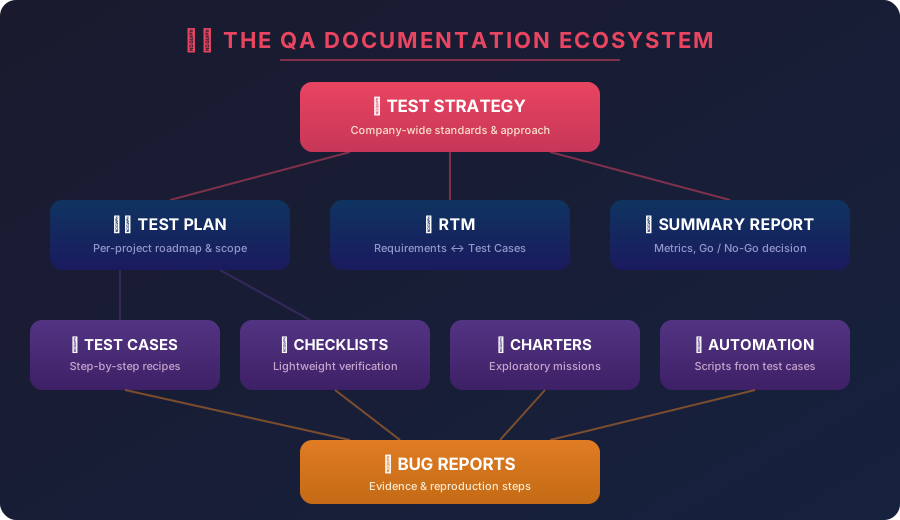 All QA artifacts form a layered ecosystem — from company-wide strategy down to individual bug reports.
The Big Picture Starts with a Strategy
Test Strategy — A static, high-level document that defines the overarching testing approach, methodologies, and standards to be applied across an entire organization or long-term project.
Before you even think about testing a specific button, the company needs a strategy. This is the "big picture" document. It doesn't change for every release; instead, it sets the standards for how the entire QA department works.
It covers the high-level stuff like: What testing levels are we using (Unit, Integration, System)? What is our general approach to security and performance? What tools are approved for our automation framework?
Without a strategy, every team in the company would be testing differently, using different tools, and reporting bugs in ways that confuse the developers. It's the constitution of your QA world.
Key Elements of a Test Strategy
| Element | Purpose | Example |
|---|---|---|
| Testing Levels | Define layers of verification | Unit, Integration, System, UAT |
| Test Types | Specify what qualities to check | Functional, Performance, Security, Usability |
| Tool Standards | Align the entire team on tooling | Selenium for UI, JMeter for load, Jira for tracking |
| Environment Policy | Standardize where tests run | Dev, Staging, Pre-prod, Production |
| Entry/Exit Criteria | Define when to start & stop testing | Entry: Build passes smoke. Exit: 0 Critical bugs open |
You Need a Map Before You Start Exploring
Test Plan — A formal document detailing the testing scope, objectives, schedule, estimation, deliverables, and resources required to complete testing for a specific software product.
Imagine you are hired as a junior QA at a fast-moving startup. On your first day, they point you to a complex payment system and say, "Go test it." If there is no documentation, you'll spend weeks just trying to figure out what the "Buy" button is even supposed to do.
This is where the Test Plan comes in. It is your roadmap for a specific project or sprint. A good test plan tells you: What features are we actually checking? Who is responsible for which part of the system? What environments are we testing on (Staging, Production)? When do we stop testing and call the release a success?
Without this map, you'll end up testing the same thing five times while missing a massive security hole in the login page. Documentation protects your product from the dangers of "tribal knowledge" — that secret info that only lives in the head of one senior dev who is about to quit and move to a tropical island.
It Is Way Cheaper to Fix a Typo Than a Total System Crash
Cost of Quality — An economic metric representing the financial impact of defect remediation across different stages of the Software Development Life Cycle (SDLC).
There is a huge financial reason why your boss wants those docs. Research from organizations like IBM and NIST shows that catching a bug early in the requirements phase is about 100 times cheaper than fixing it after the software is released.
If you find a logical flaw while you are drafting Test Scenarios (the high-level ideas of what to test), it costs basically nothing to fix. You just change a sentence in a document. But if that bug makes it into production, the costs skyrocket. You have to pull developers off new features, restart the entire testing cycle, and potentially deal with angry customers or legal fines.
 Finding bugs early is exponentially cheaper. A $100 fix in design becomes a $15,000+ disaster in production.
The math usually looks like this:
| Phase | Cost to Fix | What It Involves |
|---|---|---|
| Design | ~$100 | Change a sentence in a document |
| Testing | ~$1,500 | Restart test cycles, re-validate |
| Production | $10,000–$15,000+ | Pull devs, restart QA, handle angry customers, potential legal fines |
Good documentation is your best cost-saving tool. It lets you "Shift-Left" — which is just a fancy way of saying "test earlier and find the big problems before the code is even written."
The RTM Keeps You from Missing the Obvious Stuff
One of the most powerful tools in your kit is the RTM. A Requirements Traceability Matrix (RTM) is a grid-based artifact that establishes bi-directional mapping between business requirements and their corresponding test cases. It sounds complicated, but it's just a simple table that links every requirement to a specific test case.
Each entry begins with a Requirement ID to define the "what," such as "User must be able to reset password." This is directly paired with a Test Case ID to define the "how," like "TC-101: Verify password reset email arrives."
The RTM ensures you have 100% test coverage. If a developer changes a feature, you can look at the matrix and instantly see which tests you need to run again. It stops that "broken telephone" game where the product owner wants one thing, the developer builds another, and you are left guessing.
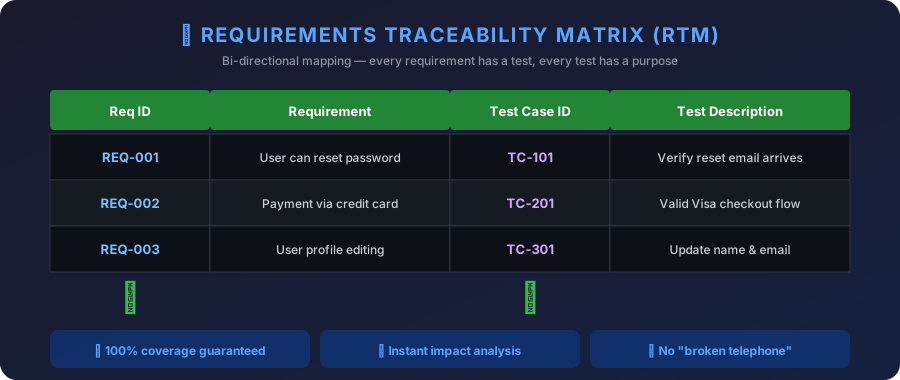 Every requirement maps to a test case — and every test case traces back to a requirement. No gaps allowed.
Detailed Test Cases Are Your Step-by-Step Recipes
Test Case — A granular documentation of specific inputs, execution conditions, testing procedures, and expected outcomes designed to verify a particular software requirement.
When you need to make sure a feature works exactly the same way every single time, you use a test case. It's a literal recipe for testing. It includes the preconditions (what you need before you start), the steps to take, and the expected result.
These documents are great for:
- Regression testing — to make sure the old stuff didn't break when you added new stuff
- Compliance — proving to auditors that you actually tested the security features
- Onboarding — helping a junior QA run a complex test without needing a 2-hour meeting
Checklists Are Your Best Friend in a Fast Startup
Sometimes, writing a massive 10-step test case for every single button is a waste of time, especially in a startup that changes its mind every Tuesday. In these cases, checklists are a lifesaver.
QA Checklist — A lightweight, non-prescriptive testing artifact used to track the completion of specific verification tasks without detailed procedural steps.
It is basically a lightweight list of prompts:
Try logging in with the wrong password. Check if the "Forgot Password" link works. See what happens if the internet cuts out during payment.
Checklists give you speed and flexibility. They rely on your intuition as a tester. You can whip one up in minutes and it still ensures you don't forget the basics during a rush.
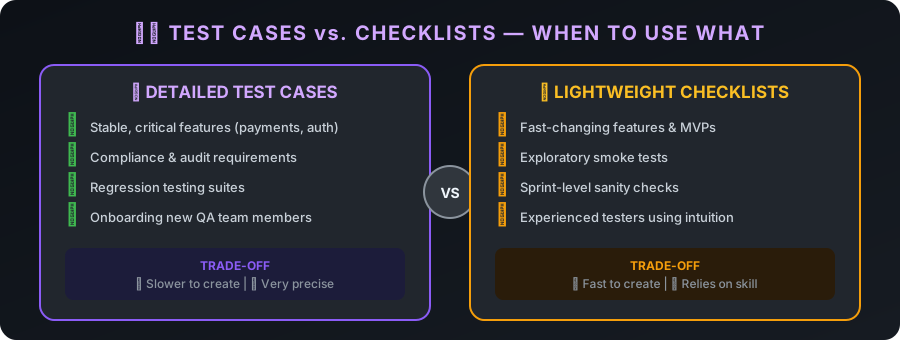 For stable critical features, use detailed test cases. For fast-changing MVPs, a solid checklist is usually enough.
Stop Writing Bug Reports That Everyone Hates
Bug Report — A technical document that captures a software defect's diagnostic data, environmental context, and reproduction steps to facilitate developer remediation.
If you want developers to actually fix your bugs, you have to write reports that don't make them want to throw their laptops. A bad report says: "The checkout button doesn't work." That helps nobody.
A great bug report includes four critical elements:
- A Descriptive Title — giving the developer a clear headline, like "Login returns 500 error when using special characters", so they immediately understand the scope of the issue.
- Steps to Reproduce — a simple, numbered 1-2-3 list that allows anyone to see the bug for themselves without playing a guessing game.
- Actual vs. Expected Results — clearly showing the difference between what happened and what was supposed to happen.
- Technical Evidence — the most important part: screenshots, recordings, or logs, allowing the developer to see the "crime scene" and fix the root cause without having to investigate from scratch.
When your report is clear and includes evidence, the "ping-pong" game stops. The developer doesn't have to ask you five questions — they just look at the logs and fix the issue.
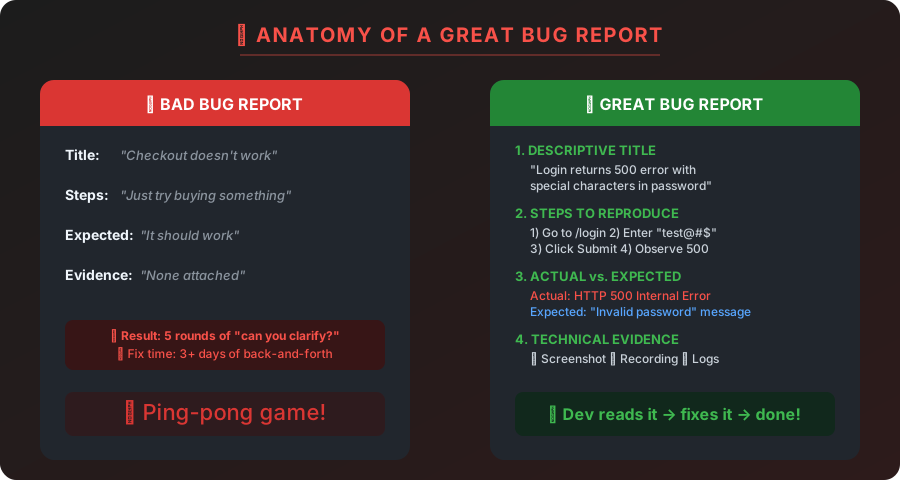 A bad report creates 5 rounds of back-and-forth. A great report gets fixed on the first try.
Use Charters When You Need to Go Off-Script
Sometimes the best bugs aren't found in a script. They're found when you just play around with the app. But "playing around" isn't a professional strategy. That's why we use Charters for exploratory testing.
Exploratory Test Charter — A mission statement for a time-boxed testing session that defines the target, resources, and specific information goals without prescribing exact steps.
A charter gives your session a goal so you don't get distracted. It defines your Target, like the "Edit Profile" page, and specifies your Resources, such as using a slow 3G network and an old Android phone. Most importantly, it sets your Mission, which in this case is to find out if the app crashes when uploading a 10MB image.
By documenting your mission and your findings, you turn "clicking around" into a structured, valuable testing activity that you can actually report to your manager.
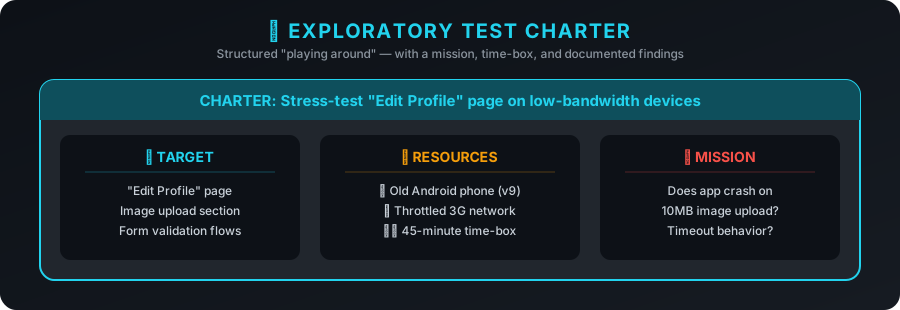 A charter turns unstructured "playing around" into a focused, time-boxed, and reportable mission.
You Cannot Automate a Process That Is a Total Mess
Test Automation — The use of specialized software to control the execution of tests and compare actual outcomes with predicted outcomes.
Everyone wants to jump straight into test automation. It's the "cool" part of the job. But here is the secret: you cannot automate a mess. Automated tools like Selenium or Playwright are not smart. They do exactly what you tell them to do.
Your manual test cases are the blueprints for your automation scripts. If your documentation is vague, your automated tests will be "flaky" — they'll fail for no reason and waste everyone's time. Documentation tells the script exactly what to check and what data to use. Without it, you are just executing bad tests faster.
Bad Things Happen When Teams Stop Writing Things Down
There are plenty of horror stories about what happens when documentation is ignored.
Take the Samsung Galaxy Note 7. A failure in documenting and testing the battery management system led to phones literally exploding, a $17 billion loss, and a massive hit to the brand's reputation.
Or consider the "Silence of the Bugs" — a project that looked perfect for months because the team only tested the "happy path" and never documented how the different parts of the system were supposed to talk to each other. When they finally assembled the system, it collapsed under 13 critical defects found in a single afternoon.
When you skip the paperwork, you are ignoring the technical debt that will eventually come back to haunt you.
Modern Teams Are Treating Their Docs Like Real Code
The coolest trend in QA right now is Docs-as-Code. Instead of putting your test cases in a giant Word document, you write them in Markdown and store them in the same Git repository as the actual software.
Documentation-as-Code (Docs-as-Code) — A methodology where documentation is created using the same tools and workflows as software development, including version control and CI/CD.
It means:
- No more switching tools — you write your tests in the same IDE you use for code
- Version control — you can see exactly who changed a test case and why
- Stay in sync — you can't merge a new feature unless the documentation is updated too
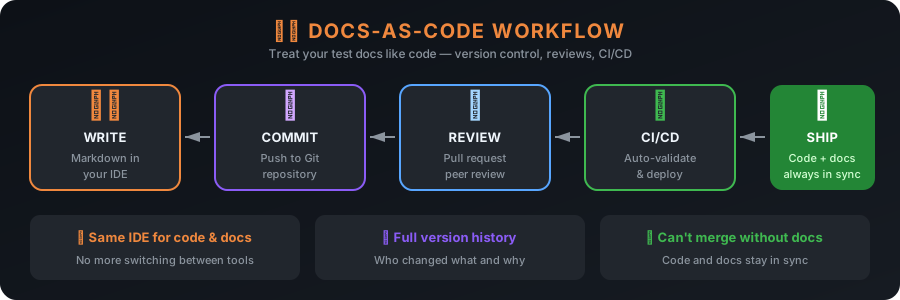 Write in Markdown, commit to Git, peer review, CI/CD validates — ship code and docs together.
BDD Makes Sure Everyone Speaks the Same Language
Behavior-Driven Development (BDD) — An Agile process that uses natural language scenarios to bridge the communication gap between technical and non-technical stakeholders.
Teams are also using BDD to make their docs more readable. This uses a language called Gherkin to write tests in plain English using "Given-When-Then" steps.
Given the user is on the login page.
When they enter a valid email.
Then they should be redirected to the dashboard.
This makes the documentation easy to read for non-technical people but also acts as the source code for automated tests. It is the ultimate way to make sure everyone is on the same page.
 BDD scenarios are readable by everyone, executable as automated tests, and serve as a single source of truth.
The Test Summary Report Is Your Final Grade
After all the testing is done, you need to tell the boss if the software is ready to go. You don't just send a Slack message saying "Looks good." You create a Summary Report.
Test Summary Report — A document that provides a high-level evaluation of the testing phase, including execution metrics, defect statistics, and a final quality assessment.
It summarizes:
- Execution Metrics — how many tests were run versus how many passed
- Defect Statistics — how many bugs are still open and how serious they are
- Final Recommendation — giving the project a simple "Go" or "No-Go"
This is the document that stakeholders actually read. It turns all your hard work into a clear statement of quality that helps the business make a decision.
Write It Down and Save Your Future Self Some Pain
Writing documentation takes time. There is no way around that. But the cost of not writing it is always higher. Whether it is a confusing bug that takes three days to explain to a developer or a massive production failure that costs millions, the lack of documentation is usually the root cause.
Your QA docs are your safety net. They are the backbone of your strategy and the only reason you can sleep at night before a big release. Stop relying on your memory. Write it down. Your future self will thank you.
The Complete QA Documentation Toolkit
| Document | When To Use | Update Frequency |
|---|---|---|
| Test Strategy | Company-wide standards | Yearly / major shifts |
| Test Plan | Per-project roadmap | Each release / sprint |
| RTM | Requirement-to-test mapping | When requirements change |
| Test Cases | Stable, critical features | As features evolve |
| Checklists | Fast-moving / exploratory | Every sprint |
| Bug Reports | When defects are found | Per defect |
| Charters | Exploratory sessions | Per session |
| Summary Report | End of testing phase | Per release |